The Icesus Mudlet Package
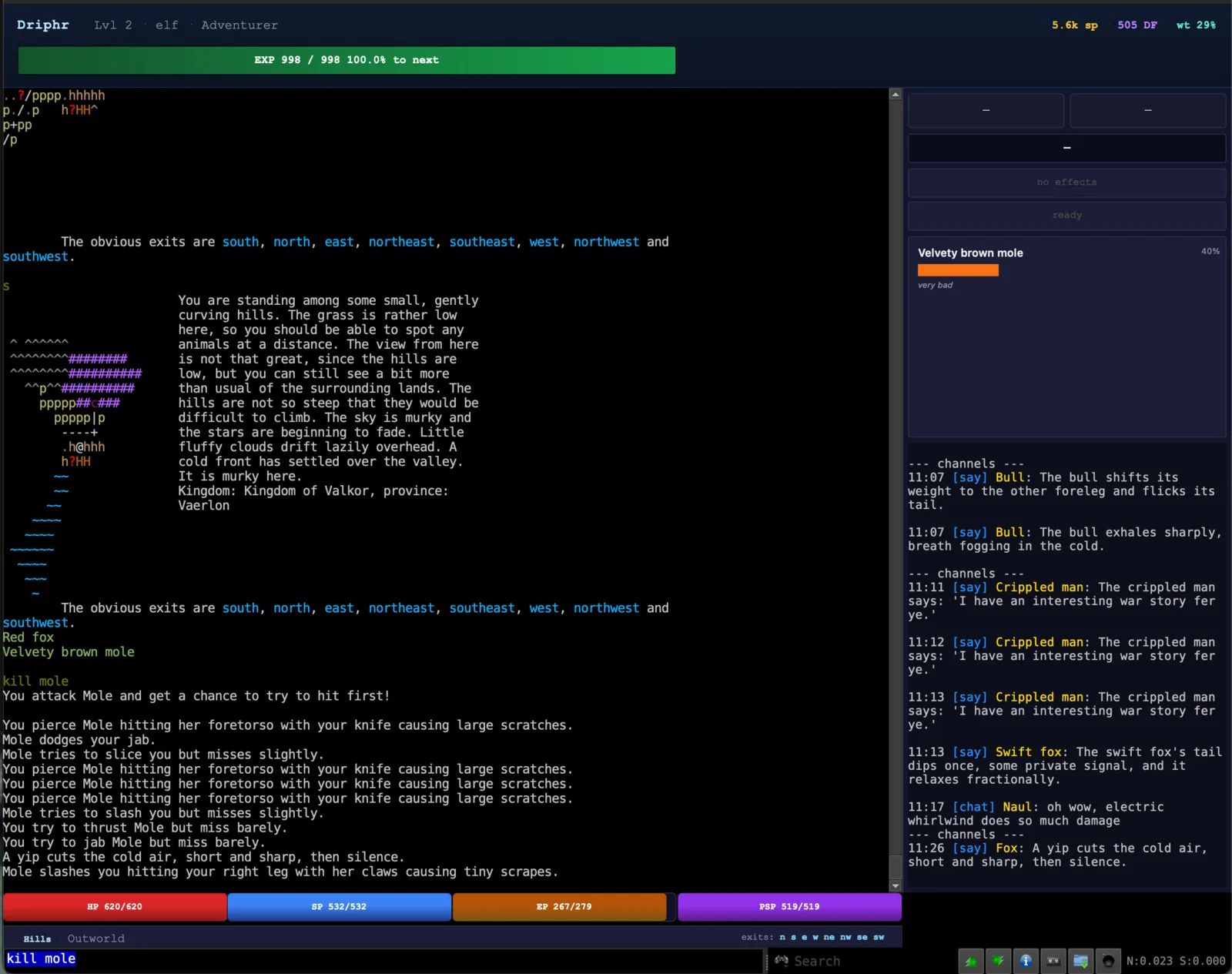
An official, GMCP-driven HUD and automapper for Mudlet. One install gives you the same panels the browser client uses (vitals, EXP, identity, casting, cooldowns, status effects, an enemy bar, exits and a channel feed) plus a map that draws itself as you walk, and the package keeps itself up to date. You don't write any triggers or Lua.
Install
One line in Mudlet
Paste this into Mudlet's command line:
lua installPackage("https://github.com/Icesus-mud/mudlet-package/releases/latest/download/Icesus.mpackage")Then connect to icesus.org on port 4443 (TLS) or 4000 (plain). You should see a green line on load:
Icesus v1.0.x ready.You can also download Icesus.mpackage from the latest release and install it with Toolbox → Package Manager → Install.
Direct from source
If you want to track master and tweak the script, clone the repo and import package/Icesus.xml via the same Package Manager → Install dialog. Mudlet imports the XML directly: no .mpackage step.
git clone https://github.com/Icesus-mud/mudlet-package.git
# In Mudlet: Toolbox → Package Manager → Install
#   → pick mudlet-package/package/Icesus.xml
Hot-reload works: edit the script in Mudlet's IDE and the HUD rebuilds itself cleanly. An update replaces the script, so turn updates off (below) while you work on your own copy.
The package keeps itself up to date. Each time the profile loads it checks for a newer release and installs it without a restart, and your settings survive. To stop that, put config = { autoUpdate = false } in Icesus.user.lua (see Customising). On first install it also removes Mudlet's bundled generic_mapper, which would fight the Icesus mapper over the same rooms.
The HUD is GMCP-driven end-to-end. If vitals stay blank or the enemy panel never appears, the most likely cause is GMCP not being negotiated. Check that GMCP is enabled in the profile's connection settings. Everything else (the gauges, the panels, the casting bar) follows from there.
What you get
Three regions of HUD wrap the main console. The console itself is untouched, so existing prompts, logs, and triggers keep working.
Top banner
Identity row
Name, level, race, and guild from Char.Base. Right after the level it shows Sleeping, Resting, Meditating or Unconscious whenever you are not standing.
Carry summary
Money, divine favor, and carry weight % from Char.Status. Hunger, thirst and drink (hungry, thirsty, tipsy) appear in front of them whenever you are not fed, watered and sober.
EXP gauge
Full-width forest-green bar with current EXP and percent to the next level. At level 100 it tracks progress to your next advancement point instead.
Bottom strip
Vitals
HP / SP / EP gauges, plus PSP if your character has any. HP pulses red below 25 %.
Location & exits
Current room, area, the time of day (late evening), a SAFE chip when applicable, and open exits as short cyan letters (n e s w u).
Guild readings
For guilds that run on a resource: fury or vitae, a templar's four bond strengths with ▲ or ▼ for filling or draining, and the active charm. Click it, or type hud guild, for bond load and drain, souls, charm abilities and devotion.
Right column
Momentum buttons
Clickable labels such as STRIKE that light up when Char.Status.momentum or Char.Status.special_momentum is set. A click sends use <name>, and hovering shows where the momentum came from, such as combat or mining.
Casting / busy bar
Fills over Char.Casting.progress / cps. Turns amber for other busy activity such as camping, smelting or fishing.
Status effects
Colour-coded badges for bleeding, stunned, poisoned, burning and death sickness (Char.Status.effects). Concealment you switched on (SILENT, HIDDEN, INVIS) leads the row in cooler colours and karma you spent (☯ EXP, ☯ LUCK) follows in gold, so you notice when one lapses. Each bleeding wound gets its own badge, such as LEFT ARM NASTY, coloured from amber for a minor wound to deep red for a fatal one; when the row is full they combine into one BLEEDING ×3. Long names shorten before a badge would fall off the edge.
Cooldowns
Pills with name and seconds, gradient red → cyan → green as the cooldown ticks down. Truncates names when the row gets crowded.
Enemy panel
One bar per opponent from Char.Status.enemies, using the server's 12-tier shape buckets so it never claims more precision than consider would. Cleared by Char.EnemyDeath.
Channel feed
Every channel, tell, and whisper from Comm.Channel echoed into a side miniconsole, with timestamps.
The HUD reserves 360 px on the right, 92 px at the top, and 64 px at the bottom. The main console fills the rest. hud side left moves the right column to the left.
Mapper
Press F11 to open Mudlet's mapper window. The package builds the map from Room.Info as you walk: rooms, exits, and special exits such as enter shop. Outworld tiles land at their real coordinates and draw as a coloured grid (roads brown, forest green, water blue), and indoor rooms are placed near the entrance you came in by. A few rooms, such as the void rifts, send no map data and stay off the map.
The map saves itself when you stop moving, and always when you disconnect or close the profile. The package also keeps rolling backups of it.
mapper save              save now
mapper autosave off      save by hand (on switches back)
mapper restore           list backups; mapper restore N rolls back to one
mapper outworld roads    map only roads, gates and landmarks outside (full, off)
mapper off               pause mapping; mapper on resumes
mapper reset             start the map again from scratch
Customising
Type hud in Mudlet to see what is set and where it came from. The common changes have their own commands:
hud side left|right    move the combat and chat column
hud font <name>        HUD font
hud chatsize <n>       channel feed text size
hud example            write a starter Icesus.user.lua
hud reload             re-read your files without relogging
hud reset              forget what hud set
hud guild              bonds, souls, charm abilities and devotion
For colours and everything else, run hud example. It writes Icesus.user.lua in your Mudlet profile folder with every setting commented out: remove the -- in front of one and run hud reload. Updates leave that file alone.
If the HUD looks frozen after a bad connection, paste lua icesus.install() into the command line. It rebuilds the HUD and leaves your map and settings as they are.
Which GMCP packages it subscribes to
The package registers anonymous handlers and tells the server which modules it wants via Core.Supports.Set:
Char 1
Char.Base 1
Char.Vitals 1
Char.Maxstats 1
Char.Status 1
Char.Casting 1
Char.Cooldowns 1
Char.Resources 1
Char.EnemyDeath 1
Comm 1
Comm.Channel.Tell 1
Comm.Channel.Text 1
Room 1
Room.Info 1
Room.Speech 1
The subpackages are listed even where Char 1, Comm 1 or Room 1 already covers them, so the subscription says what the package reads. Type help gmcp in the game for the full reference, and read the Mudlet GMCP guide for what each module can drive.
If you'd rather build your own
The package is one file under a single icesus Lua table. Editing it in Mudlet's IDE replaces the running HUD cleanly, so it doubles as a working starting point if you want to fork it. Its palette, gauge gradients and fonts come from the browser client. An update replaces the whole script, so keep small changes in Icesus.user.lua, or in Icesus.custom.lua for code; updates leave both alone.
If you'd rather wire panels by hand from scratch and learn how each GMCP module works in isolation, the Mudlet GMCP guide walks through the modules one at a time without assuming the package is installed.
Community packages
Players write Mudlet packages for Icesus too. These are made and kept up by their authors, not by the Icesus team, and run alongside the official package.
Icesus Effects
By Merak. Tracks your spell and skill effects from their game messages. Each effect gets a button on the right edge of the main window, and timed effects show how long they have run and roughly when they will end, learned from your earlier casts. It can warn you before an effect runs out, and icefx sync lines it up with the game's effects list. Instructions and source: github.com/destor/icefx. To install, paste this into Mudlet's command line:
lua installPackage("https://github.com/destor/icefx/releases/latest/download/IcesusEffects.mpackage")Bug reports and contributions
Source, issues, and pull requests live at github.com/Icesus-mud/mudlet-package. The repo also includes a headless dev harness (tools/mudlet-dev/) that runs Mudlet under Xvfb against a small GMCP replayer, so contributors can iterate on HUD layout and screenshot the result without touching a real desktop. See CONTRIBUTING.md for details.
Related guides
Ready to install?
Download Icesus.mpackage