Best MUD clients · 2026
Find your way
into the world.
A good MUD client makes the game easier to read, navigate and enjoy. Compare six free options, from a browser tab to a desktop setup you can make your own.
New to Icesus? Create your character
Free to play · No download for browser play · Ages 16+

Browser or desktopChoose how you like to play

Six free optionsA fit for different setups

Your character stays yoursClient settings are separate

Start with what matters to you.
I want to play today.
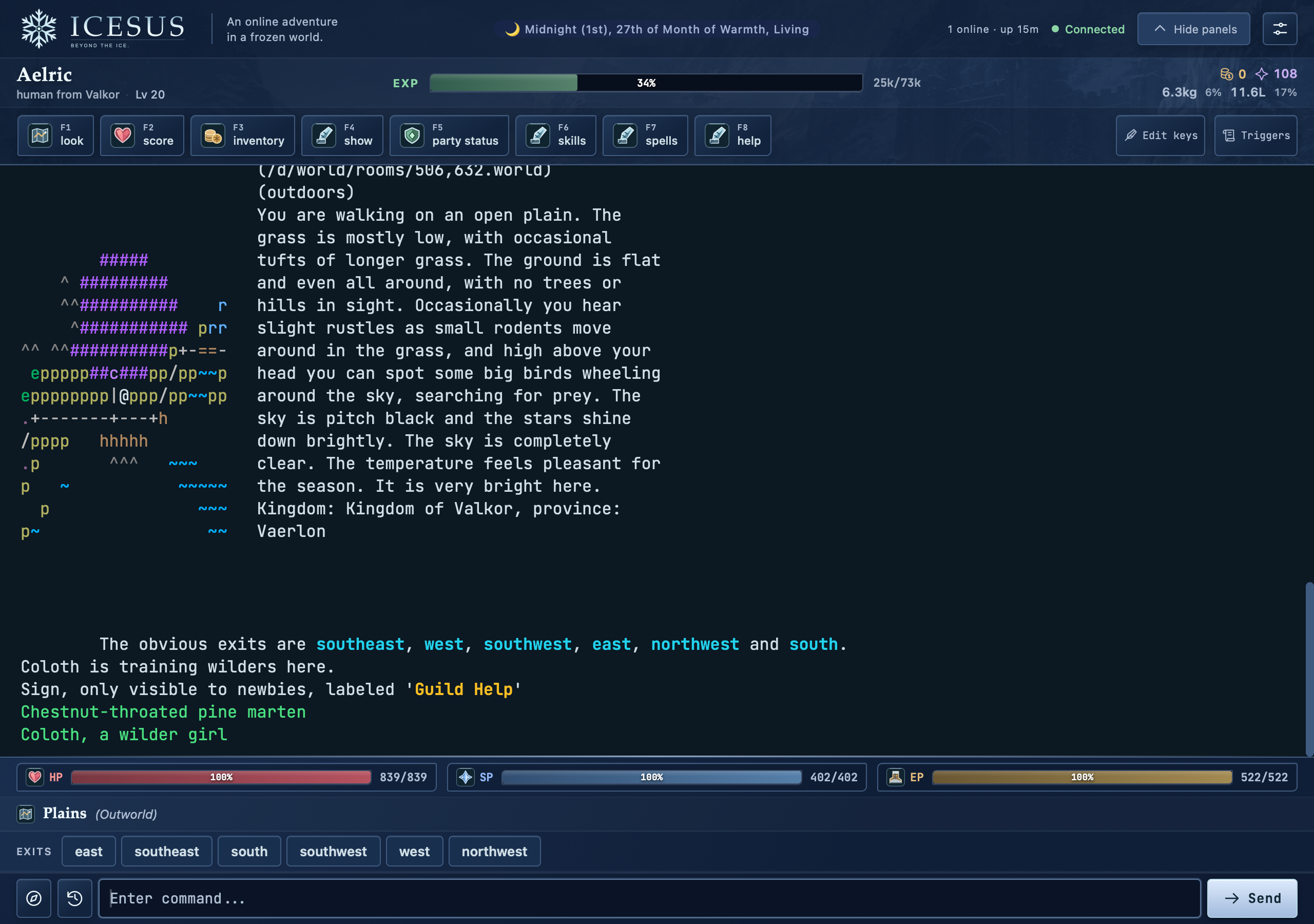
Use the game’s browser client. For Icesus, you can create a character and begin without installing a program.
See browser play →I want maps and a custom layout.
Mudlet is our desktop starting point for Windows, macOS and Linux. Check whether your game supplies a ready-made package.
Meet Mudlet →I prefer a terminal.
Look at Blightmud for Lua and built-in GMCP, or TinTin++ and TinyFugue if their scripting suits you.
Compare terminal options →
Six clients. Different ways to settle in.
Choose by device, setup effort and the tools your game actually supports. A mapper or health panel depends on the game’s data and the package you use.
On a small screen, scroll the table sideways to compare.
| Client | Runs on | Useful for | Setup to expect |
|---|---|---|---|
| Mudlet | Windows, macOS, Linux | Graphical mapper, Lua scripts, game packages | Install the client; add your game’s package if available. |
| Browser client | Supported browsers, including phones | Starting quickly, playing away from your computer | Open the game’s client. Features vary by game. |
| Blightmud | Linux, macOS | Terminal play, Lua, GMCP and speech options | Install a terminal client; configure or add a package. |
| TinTin++ | Linux, macOS; Windows through WSL | Terminal scripting and an ASCII mapper | Learn its command language and mapping setup. |
| MUSHclient | Windows | Plugins, scripts and game-specific soundpacks | Choose plugins appropriate to your game and needs. |
| TinyFugue | Unix-like systems | Keyboard play and TF macros | Version and build options affect protocol support. |

Find a setup you will enjoy using.
Mudlet
Our desktop pick for maps and customisation.
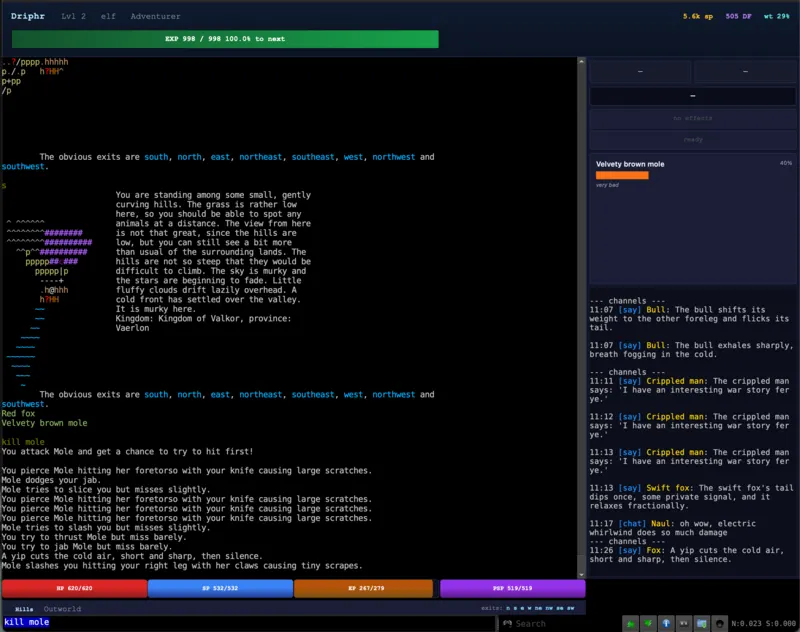
Mudlet combines a graphical mapper, Lua scripting, aliases and triggers. The Icesus package adds game panels, so you can begin with a useful layout and customise it later.
Keep in mind: A built-in mapper does not mean every game arrives fully mapped. Packages and game support matter.
Browser clients
A simple first step, wherever you play.
The Icesus browser client surrounds the game text with resources, exits and movement controls. It supports mobile play and screen-reader settings. Other games offer their own browser clients with different features.
Keep in mind: A phone works for a first look; a larger screen and physical keyboard can be more comfortable for longer sessions.
Blightmud
For terminal players who like Lua.
Blightmud provides Lua scripting, GMCP, TLS, a screen-reader mode and optional text-to-speech. Our Icesus setup guide covers the game package and its status display.
Keep in mind: Installation and speech support depend on your platform and build. Read the project’s instructions for your system.
TinTin++
For a carefully tuned terminal setup.
TinTin++ offers its own scripting language, split-screen output and an ASCII mapper. Aliases, triggers and mapping can grow with the way you play.
Keep in mind: This is a toolkit to configure. Expect to learn its commands, especially for mapping and structured game data.
MUSHclient
For Windows players with a useful plugin or soundpack.
MUSHclient provides aliases, triggers, scripts and plugins. A game-specific package can supply maps, panels or sound, making the package itself an important part of your choice.
Keep in mind: Check the exact package’s compatibility and accessibility instructions rather than assuming every setup behaves alike.
TinyFugue
For players who enjoy TF macros.
TinyFugue is a terminal client with a long history and a macro-based workflow. It can be a comfortable home for an existing configuration.
Keep in mind: Forks differ. The Rebirth fork documents optional GMCP build support; older installations may not offer the same features.
Try the world before tuning your setup.
The same Icesus character can travel with you from the browser to a desktop client. Start by learning the world, then decide which extra tools would help you enjoy it.
-
Create someone to play.
Choose your character in the browser builder.
-
Learn a few commands.
Follow the guided introduction and keep the beginner guide nearby.
-
Make the setup your own.
Stay in the browser or try a desktop package when you know what you want.

A few useful answers
What is a MUD client?
A MUD client connects you to a multiplayer text game. It displays the game’s output and sends your commands. Some clients also provide maps, logs, shortcuts and scripts. A browser client is still a client; it runs in a web page.
Which free MUD client should I try first?
For Icesus, try the browser client if you want to play without installing anything. Choose Mudlet if you want a desktop mapper and Lua scripting. The best fit depends on your game, device and accessibility needs.
Can I use the same Icesus character in another client?
Yes. Your character belongs to the game. You can return with another supported client using the same character login. Client settings, local logs, maps and scripts may need separate setup; disconnect the old session before switching.
Which client works with my screen reader?
Try your actual screen reader and device before investing in a setup. Icesus has browser and in-game screen-reader settings. Blightmud documents a screen-reader mode and optional text-to-speech; game-specific MUSHclient soundpacks are another option. See our accessibility guide.
Do I need scripts or a mapper to begin?
No. You can read room descriptions and use short commands from the start. A game package can add useful panels later. Follow the game’s rules when setting up aliases or triggers.
Are all MUD clients free?
The clients covered here are free to use. That is not a claim about every client available, or about the cost of the game you connect to. Check each project’s official site before downloading.
Keep exploring
Your next step
Your next adventure can start in a tab.
Icesus is a free multiplayer fantasy world. Make a character, learn the roads and find people to share them with.
No download · Free to play · Ages 16+