
01 · Make a beginning
A character, a command line, a world.
A MUD means multi-user dungeon: a multiplayer RPG played through text. Places, people, and events appear in words. You act by typing short commands, such as look or north, and pressing Enter.
Open the character builder and explore your choices before the account step. Keep this guide beside the game if you find that helpful.
Make your character
Explore races, choose a profession, then shape your upbringing, calling and story. The game explains each path and its requirements.
Your choices point you toward a profession; you still join its guild in the world.
Continue later
Your unfinished character is saved in this browser. Return here and choose Continue your character. The account step comes last; playing is for ages 16 and over.
You can explore another race or career later through reincarnation.
 Using a screen reader? See our accessibility guide. Once in the game,
 screenreader on adjusts the output for reading aloud.
02 · The new guided beginning
A fire, a friend,
and the road to Vaerlon.
Your first life begins at the Parson’s Head, a wayhouse on the road to the city. Alice, a travelling ranger, helps you learn by doing: talk to people, handle an encounter, and prepare for the journey.
Follow the prompts as they appear. When the game asks you to type ready, do so to continue. There is more to discover around the wayhouse if you want to linger.
Find your feet at the wayhouse
Meet Alice, inspect your surroundings, and learn how conversations and everyday actions work.
Prepare for the cold road
Practise judging danger and handling an encounter. Gather provisions for the walk ahead. Follow Alice’s advice about fighting or retreating.
Walk to Vaerlon with Alice
When the way is open, set out from the yard with her. The snowy road brings you into the shared world and leads toward your first work in the city.
progressCheck your tutorial goals.repeatRead the latest instruction again.journeySee your chapter and next step.You can take a break. The guided journey saves safe checkpoints; an unfinished chapter may replay from its beginning when you return. journey pause quiets the guidance, and journey resume brings it back while newcomer guidance is available. See how to save and leave.
Already know your way around MUDs?
You can type end tutorial and confirm to travel ahead to Vaerlon. You will miss Alice’s walk and any tutorial gear you have not collected. In the private tutorial, restart offers a fresh run; it is separate from pausing your journey.
03 · Let the words open doors
The description is part of the game.
A room tells you where you are, what is nearby, and what might be worth trying. Read it for clues: a person to greet, a sign to inspect, a path to follow.
look
A wayhouse beside the snowy road
Snow gathers against the shutters. A fire burns in the hearth, and a traveller warms her hands beside it.
A travelling ranger is here.
Obvious exit: south.
Try look fire. Descriptions can lead to useful objects and discoveries.
In Alice’s tutorial, follow her prompts. Elsewhere, try greet name, then ask name about topic, using the person’s name and a subject they mention.
Type south when you want to follow that exit. Use look to read your new surroundings.
 Type one command at a time. Words such as
 name and topic in examples are placeholders: replace them with what you see in the game.

04 · The city opens up
You have arrived. Choose a next step.
In Vaerlon, type journey to pick up your own next instruction. The opening adventure introduces Vizra’s warehouse, with work to do and more than rats to discover. Your offered goals can lead you into the cellar, a mystery, or the city streets.

Follow a lead
Listen to Vizra and the people you meet. Inspect what the room describes. You do not need to uncover every secret to move on.
journeyFind your way
See named destinations, then let hiking walk the route. It works inside the city too. Use hike stop to stop walking.
map landmarks
Find a profession
Ereldon can explain guilds. Head to Central Park, then ask him about guilds. Follow your preset’s advice or explore another path.
hike to central parkGuilds teach your skills and spells. At a guild, read its plaque and speak to the trainer about joining. Training and advancement happen in the appropriate guild rooms and cost experience and money. Quick Start does not replace this step.

Pick your first fights carefully
Use consider rat before attacking a rat; it estimates difficulty, not a guaranteed win. Check your gear with inventory, your health with hp, and your retreat setting with wimpy. wimpy high makes you try to break off earlier.
Fight the beginner targets the game points you toward. Leave the citizens and guards alone. Recover between fights, and use help newbie areas when you are ready to explore further.
05 · Your pocket reference
A few commands go a long way.
Type these into the game and press Enter. Copy buttons copy only the command; nothing is sent to the game from this page.
 Look & travel
lookRead the room again.inventorySee what you carry. Short form: i.map landmarksFind named places to hike to. Check & continue
hpCheck your health and resources.scoreRead your character’s status.journeyFind your next guided step.Ask & learn
help newbieOpen the beginner help index.help getLearn a command: here, picking up items.channel join newbieJoin the beginner help channel.There are people on the other side.
Ask with newbie How do I find my guild? Use who to see who is online, say hello to speak in your room, or tell name message to contact a player privately. help helper explains the dedicated newbie helpers.
If a command does not work, check its spelling and context. Buying, joining, and training need the right shop or guild room. Read the room’s instructions and try help.
06 · A lamp left burning
Save your adventure for another day.
leave gameYour normal save-and-logout command.At an inn, this saves your character and stores your equipment for your next visit. While you are within the newcomer grace period, it can also guide you to shelter from elsewhere, provided you are alive and out of combat. After that grace period, you need to reach an inn first.
A lost connection is not the same as dropping your gear. Disconnecting leaves you linkdead with your equipment; reconnect to continue. For a deliberate end to your session, use leave game and read the response before closing the client.
The guided journey records safe checkpoints, so you can return to an unfinished chapter. Type journey after logging back in to find your next step.
What about quit and emergency_quit?
quit shows the game’s leaving instructions. emergency_quit is a last resort that drops your equipment; use the normal leave game command instead. If you are stuck, ask on the newbie channel.

Made for the adventure
A text world. A proper adventurer’s toolkit.
The browser client brings the important things together: your character, party, available exits, and favourite commands. Play on a computer or phone, with a command line always at the heart of the game.
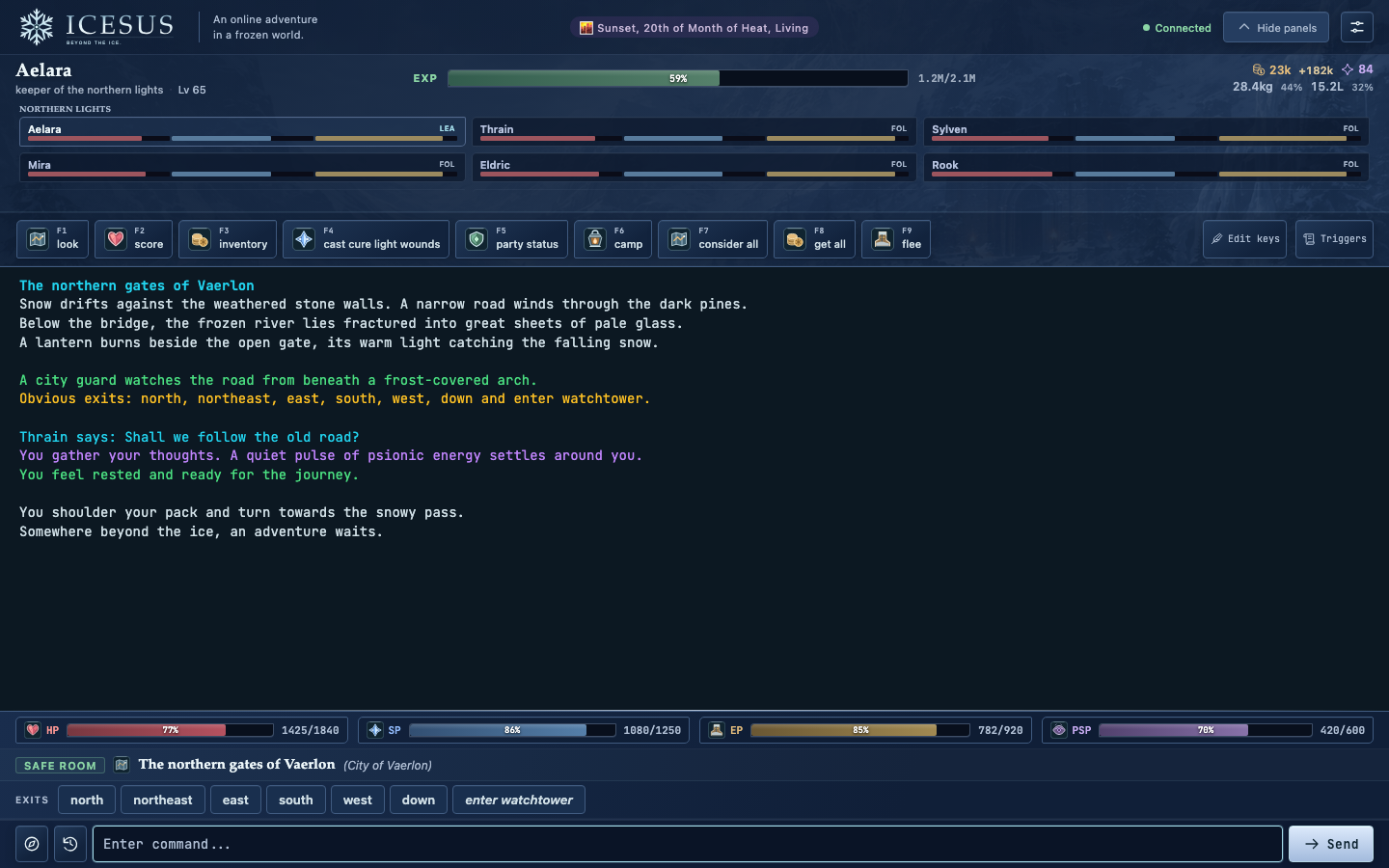
- HP Health
 SP Spell points
 EP Endurance
- PSP Psionic energy
Psionic energy is for mental abilities; it is relevant to characters who use those powers. Labels and numbers carry the meaning alongside colour.
Make it yours
Set up illustrated hotkeys for frequent commands, use clickable exits and movement controls, and adjust the text and panels. Basic triggers are available when you are ready.
Read your way
The client supports keyboard and screen-reader use. See the accessibility settings, including screenreader on in the game.
Prefer a desktop client? Compare clients or follow the Mudlet setup guide. You can keep playing the same character.
Beyond your first footsteps
A world you can grow into.
The tutorial is the beginning. As you find your footing, there are many ways to make a life in Icesus.

Live many lives
Explore races, guilds, skills, and spells. Reincarnation lets you rebuild the same character with a new race, background, and career, retaining invested experience under the reincarnation rules.
Plan a reincarnationFind your companions
Join other players for party combat. Learn how fighters, healers, spellcasters, and other professions work together against tougher foes.
Discover Icesus’s features
Make a living
Hunt, gather, craft, and trade. Learn the value of what you find and make, and build your place in a player economy.
Browse the game wikiRebuild the valley
Player councils claim provinces and develop settlements with farms, mines, workshops, and shrines. Work together to bring life back to a ruined corner of the frozen world.
See player-built provincesFollow the old roads and explore what lies beyond them. The world atlas gives you the wider view; Legends records the achievements of the people who call this world home.
Before you set out
A few beginner questions.
Is Icesus free to play?
Yes. Icesus is a free, community-run game operated by Jää ry, a Finnish non-profit association. There are no required purchases to play. Read about Icesus and its community.
Do I need MUD experience or special software?
No. Start in the browser on a computer or phone. The visual builder guides your character choices, and the tutorial teaches the first commands through play. You read and type in English; no coding knowledge is needed.
Do I have to finish the tutorial in one sitting?
No. The guided journey saves safe checkpoints. Use leave game and read the response before closing the client. When you return, an unfinished chapter may replay from its beginning; journey shows your next step.
What if I die?
Death is recoverable, but it can cost experience and cause temporary penalties. Read the instructions you receive, type help death short, and ask the newbie channel if you need help. Before your next fight, check your gear, health, and retreat setting.
What if it is too dark to see?
Until level 4 your eyes find their way even in the dark. After that, type light torch; while you are level 10 or below, a torch you carry does not burn out. You also start with two vials of nightsight: open nightsight, then drink nightsight, and you see in the dark for about an hour. Ereldon at Central Park sells more with buy vial. help light sources explains the rest.
Am I stuck with my first character choices?
No. Reincarnation lets you choose a new race, background, and guild path for the same character. You return to level one with invested experience available under the reincarnation rules. Read help reincarnation before making the change.
Where do I turn when I am lost?
In the tutorial, progress and repeat help you follow the current lesson. After arrival, journey shows your next guided step. Use map landmarks for destinations, help newbie for the help index, or ask other players on the newbie channel.
Beyond the ice.
There is a place by the fire.
Create your first character. Alice will take it from there.
Create your characterFree to play · An online adventure in a frozen world