Fantasy Worldbuilding With Real Players In It
Most fantasy worldbuilding ends in a folder nobody opens. This is the other kind: you design an area in Icesus Creator, a free browser tool, and once it is approved real players walk through it, fight in it and ask your NPCs questions. The world it joins has been online since 1995 and is still being written.
Free · No download · Sign in to Creator with your game character
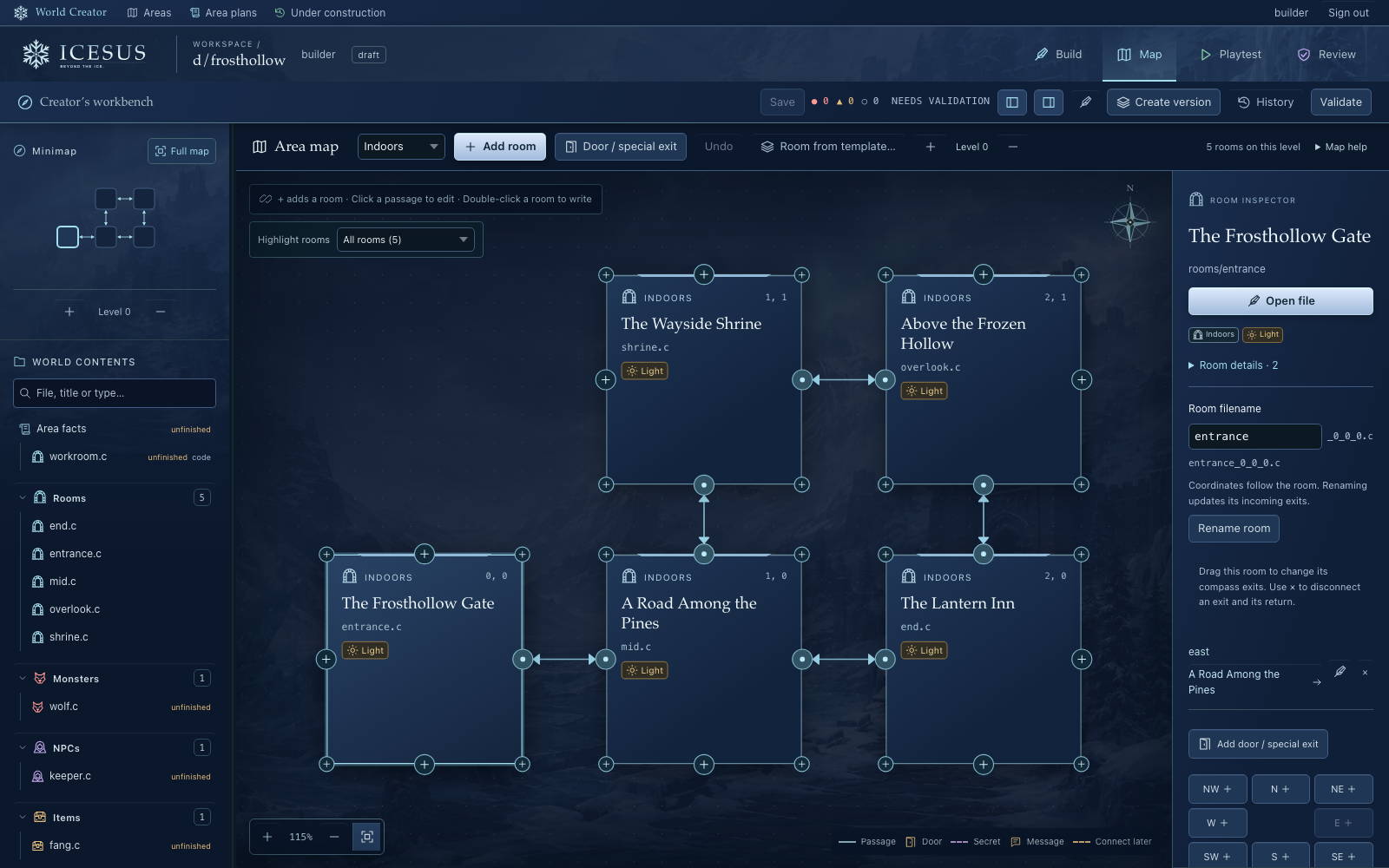
What you actually build
An area: a cluster of rooms with a reason to exist. A border post on a cold road, an inn with a secret, a ruined hall a party will remember. In Icesus Creator you lay the area out on a visual map, connect its rooms, and write what players see when they arrive and what they find when they look closer. Then you fill it: monsters and NPCs with descriptions and behaviour, items, weapons and armour, encounters, dialogue and quests.
You are not building the game. Combat, movement, saving, the economy and 16 guilds already work, and roughly 65,000 rooms across 200 areas already exist. Your area plugs into that. A monster you give a level derives sensible health and skills; a weapon with a type, material and quality knows its own weight and damage; a room knows how to be a room. What is left is the part worldbuilders actually want to do, which is inventing a place and the people in it, inside a frozen valley of twelve kingdoms that has been growing for 31 years.
Writing fields sit alongside the game code they control, so you can begin with the visual controls and see how the pieces fit as you go. Save, run the checks, and use Playtest to walk your own area in the game before anyone else does.
How it compares
Most worldbuilding tools are good at recording a world. Very few put anyone in it.
| Worldbuilding project | Who sees it | Does it get played | Tooling | What you keep |
|---|---|---|---|---|
| Worldbuilding wiki | Whoever you send the link to | No. Entries are read, not walked through. | Articles, timelines, maps as images | A private encyclopaedia |
| Fantasy map maker | You and your table | No. The map is a picture. | Terrain, labels, image export | A map |
| Play-by-post or forum RP | A small group, for as long as it stays interested | Slowly, in prose, by the people already posting | Threads and a shared setting document | A story archive |
| Icesus Creator | Every player online: dozens regularly, plus a Discord active daily | Yes. Players walk through it, fight in it and examine the nouns you named. | Visual map, room editor, NPC, item and quest tools, Playtest, wizard review | A place in a live world that stays online after you log off |
Your first week
- Play a little. Building access needs a character of player level 25 or above, so it starts with playing, free, in your browser. It is also how you learn what an area feels like from the inside.
- Read How to Build a Game World. Areas, rooms, NPCs, items and quests: the craft, and the conventions of this particular world.
- Sketch an area plan. What the place is, who it is for, where in the valley it belongs, who lives there and roughly how big it is. Say hello in the Discord #creator channel while you think it through.
- Submit the plan in Creator. Sign in with your game character and submit the plan for a wizard to review.
- Build after approval. Map the rooms, write, populate, playtest, then submit the finished area for review. Approved content joins the live game.
Level 25 is not a formality. It takes real play, and that is the point: you build for players you have been one of.
What you cannot do
You cannot import a finished setting. Icesus has its own geography, history and tone, one frozen valley with twelve kingdoms and an elemental logic that runs through everything, and a world lifted from a campaign binder contradicts all three at once. If sole authorship of a whole world is what you want, a shared world is the wrong shape, and it is fairer to say so here than after you have signed in. What does transfer is the craft, and often the pieces: the keep, the feud, the border post where the guards stopped checking papers. Treat your setting as a source of material rather than a thing to be placed, and most of it finds a home. Collaborative Worldbuilding goes into this properly.
Common questions
Is Icesus Creator free?
Yes. Icesus is free and non-profit, run by Jää ry, a registered Finnish association. There is no subscription and nothing to buy. Creator runs in your browser; you sign in with your game character.
Do I need to know how to code to build with Icesus Creator?
Not to start. You lay rooms out on a visual map and write in an editor. The writing fields sit alongside the game code they control, so you can begin with the visual controls and learn more as you build. Content is described in LPC, but you describe a thing and inherit behaviour that already exists rather than programming it from scratch.
What do I need before I can build?
A character of player level 25 or above, good writing skills, and an area plan approved by a wizard. You submit the plan in Creator, and the #creator channel on the Icesus Discord is where to talk it through first. Contribute to Icesus has the full path.
Can I build my D&D campaign setting here?
Not as a copy. Icesus has its own geography, history and tone, and a finished setting dropped into it tends to contradict all three. What you can build is the material campaign settings are made of: a keep, a border town, a shrine with a secret, as a new area inside a world that already has players in it.
Who sees what I build?
Until it is approved, only you: it lives in your workspace and in Playtest. After wizard review, approved content joins the live game, where dozens of players are online regularly and a Discord community is active daily.